







Getting Started
Part 2: How to use ESB-TKR
Enter your emulator port, pick a mode, then follow the linked guides for each mode, profiles, multiple instances and payment.
On this page
Step 1: Using the Bot (ESB-TKR)
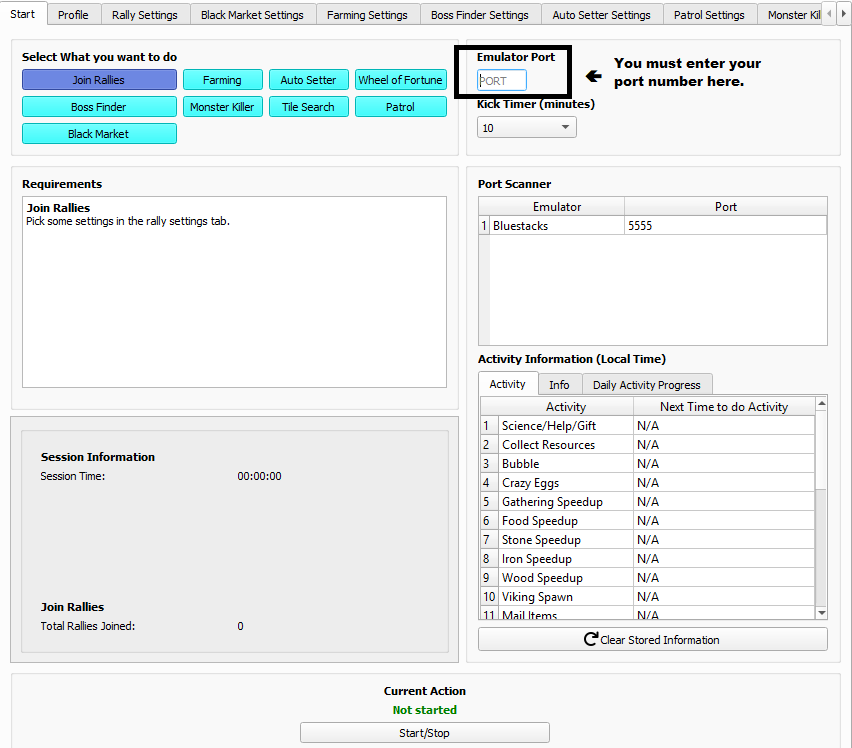
- Remember your number when you enabled ADB? Please enter your number there under the emulator port. You MUST enter it!
- Under Mode - As of 2.2.7.9, there are 9 modes:
- Join Rallies: This mode will join rallies for you. This will only join rallies for boss monsters only, and only if you have the appropriate march time to that rally.
- Farming: This mode will farm for you! It will send to tiles that you specify and the specific level you request.
- Auto Setter: This mode will auto set bosses for you. This MUST work with the boss finder!
- Wheel of Fortune: This will spin the wheel for you. You must have the wheel menu open.
- Boss Finder: Spots bosses for you. An awesome tool to help you rally and auto set.
- Monster Killer: Solo attack regular monsters, not bosses, on the map.
- Tile Search: This mode will continue to find tiles for you when farming.
- Patrol: This will patrol valuable items for you. You must have the patrol menu open.
- Black Market: This will do black market for you. You must have the black market menu open.
- Troop Training: This will train troops for you. It will train the type and tier of troops you have picked.
Now please go to one of the guides below to get started!
JOIN RALLIES MODE
Please go to the Join Rallies Guide Here: Join Rallies Guide
FARMING MODE
Please go to the Farming Guide Here: Farming Guide
AUTOSETTER
Please go to the Auto Setter Guide Here: Auto Setter Guide
WHEEL OF FORTUNE MODE
Please go to the Wheel of Fortune Guide Here: Wheel of Fortune Guide
BOSS FINDER MODE
Please go to the Boss Finder Guide Here: Boss Finder Guide
MONSTER KILL MODE
Please go to the Monster Kill Guide Here: Monster Kill Guide
PATROL MODE
Please go to the Patrol Guide Here: Patrol Guide
BLACK MARKET MODE
Please go to the Black Market Guide Here: Black Market Guide
TROOP TRAINING MODE
Please go to the Troop Training Guide Here: Troop Training Guide
Setting up Profiles to Save your Settings
To save your settings for each mode, see the following guides:
OPTIONAL: Running multiple instances with the bot
If you purchased more than one instance or are curious to see how it works, read here.
Please follow the How to run Multiple Guide here: How to run Multiple Instances Guide
HOW TO PAY
Please use the bot application to pay!
Please follow the How to Pay Guide: How to Pay Guide
HELP FAQ
“Invalid Port Number”
- Did you actually enter the port number?
- Did you enable ADB in the instance?
- Try again.
- You missed a step, contact support by opening a ticket in our Discord.
Bot isn’t opening at all.
- You probably missed a step in the original documentation. Open a ticket on our Discord for help!
- Your antivirus is taking it
“NoneType” errors are everywhere.
- Don’t play the game while the bot is running.
- Is Evony lagging? Go to bluestacks settings and mess with the Engine tab to increase performance.
- Open a ticket on our Discord if you need help.