







Automation Modes
Monster Killer Guide
Hunt monsters on the map automatically using Preset #1, with stamina consumption options and list general settings.
On this page

How to Use
Follow the steps below to understand and take advantage of this mode.
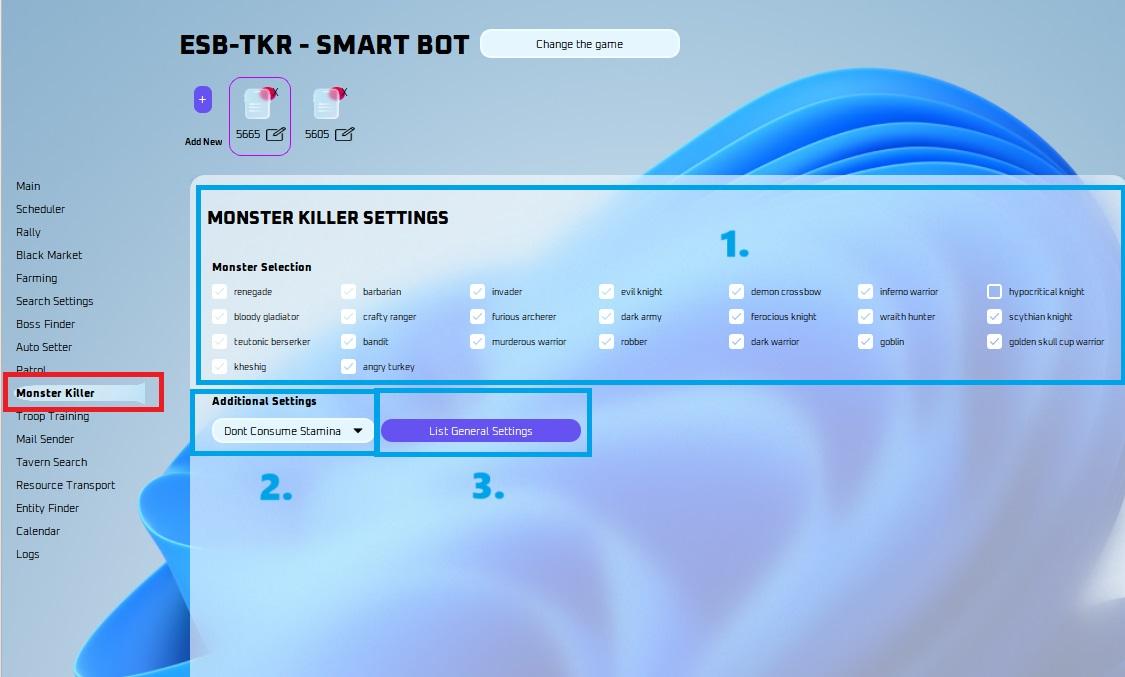
Mode:
Make sure to select the “Monster Killer” Mode as labeled in the photo above.
Consume Stamina:
- You can pick stamina usage.
- Don’t consume stamina: It will not consume stamina.
- Consume Max Stamina: Picking this option will automatically consume stamina for you up to 9,999. This way you don’t run out of stamina while hitting monsters.
- Consume One Stamina: It will only consume one x100 or one x50.
- You can pick stamina usage.
Use List General:
- This will use either the top general in the list, or attempt to find the list of generals you selected when joining rallies; if your preset has a general out, it will do that.
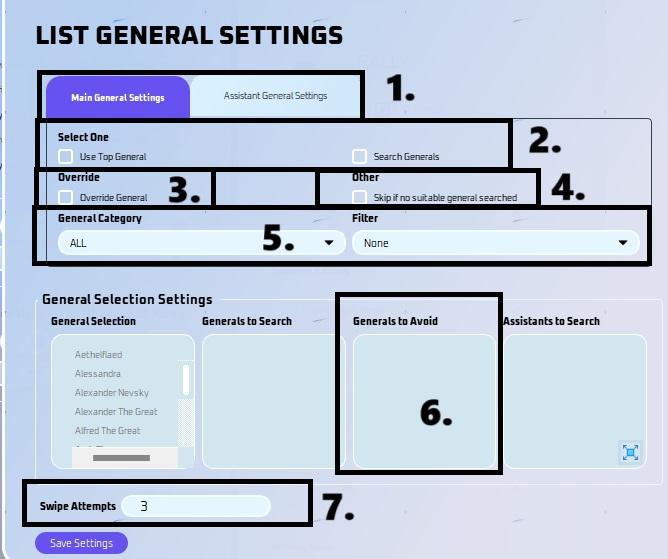
List General Settings
- Pick here if this is for Main or Assistant General Settings.
General Selection
- You can now select a list of generals you would like to search for when the general is not available in your preset.
Override
- This has the ability to override the general in your preset or default march so that you can search for other generals.
- For Assistant General, click “remove assistant general” if you want to override preset general.
Skip if no suitable general searched
- This will skip the boss if there are no suitable generals available based on your settings.
General Category
- You can now filter by category (ALL, Development, Military, etc)
- You can now also filter by favorite or idle.
Generals to Avoid
- You can now choose to avoid certain generals. This is used when selecting "Use top general". This won't matter for search generals due to the nature of it only searching for a specific general, thus naturally avoiding everything else.
Swipe Attempts
- This is how many times it will swipe down to try and find the general you have listed.
- Take note, if you got a ton of generals, you need to increase the swipe amount, then again that will take even longer to join a rally.
Note
Monster Killer will ALWAYS use your Preset #1 in game.
You MUST zoom out of the map in the game. You can do this using CTRL + MOUSE WHEEL on your computer, or using F3 on MEmu. Make sure your game isn’t full screen to do this, otherwise zooming won’t work. You may need to restart your emulator sometimes to get zooming to work.
If you want to search a specific area, you can check: ESB-TKR - Search Settings Guide. Keep in mind that fast search only works for bosses and not for normal monsters.