







Automation Modes
Rally Card Spawn Guide
Spawn bosses with the Rally Card without wasting chances by letting the Collective check for nearby bosses of the same type and level first.
On this page

Requirements
- Purchase the Rally Card in-game.
- Fill the boss queue using either multiple Boss Finders or iScout.
- Use the Collective for cross-referencing, as accurate boss data is essential for the system to function properly.
How It Works
The Collective is key to making Rally Card spawns efficient.
1. The Role of the Collective
- The Collective helps prevent wasted boss spawns.
- It keeps track of where bosses are, so when you try to spawn one, it checks if a boss of the same type and level is already nearby.
- If it finds one close (within the set radius), it stops the spawn to save your Rally Card use.
Tip
Without tools like Boss Finders or iScout feeding data into the Collective, it won’t have accurate info—leading to wasted chances.
2. Collective as the Authority
The Collective decides whether your Rally Card can successfully spawn a boss. It checks a few conditions to avoid wasting your chances:
You can spawn a boss if:
- There’s no boss of the same type and level already nearby (within a 125KM default radius).
- There’s no boss being set up (in progress) of the same type and level within that radius.
- There’s no boss currently being attacked of the same type and level in that area.
3. Cooldown
- Each boss spawn has a 5-minute cooldown, giving players time to attack. If the boss isn’t attacked in time, that chance might be wasted—but this is rare if your team is active.
- If all conditions are met, the Collective approves your spawn. If not, it blocks the spawn to prevent using up your Rally Card on a boss that already exists nearby.
Note
Using the Collective ensures smarter, more efficient boss spawning with fewer wasted chances.
Using Multiple Accounts? Team Up with the Collective!
If you're playing with multiple accounts or in a group, using the Collective makes everything smoother and more efficient. Here's how:
A. Avoid Overlaps
- The Collective keeps track of boss spawns so no one accidentally summons the same boss or wastes a Rally Card.
B. Better Coordination
- When everyone’s using the same Collective, it’s easier to plan together and get things done faster.
C. Connect All Accounts
- Make sure all your accounts—and your teammates' too—are connected to the same Collective for the best results!
Settings
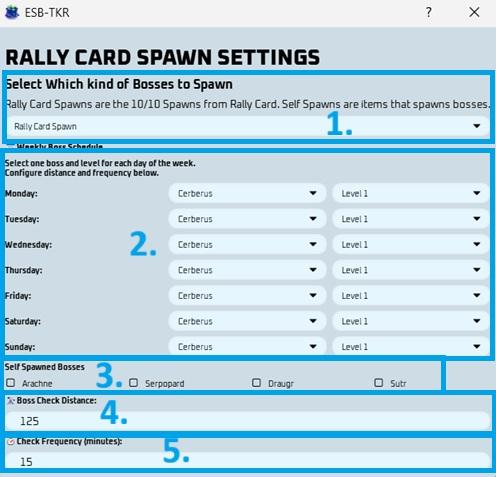
Daily Boss Spawn Planning Guide
1. Select Which Kind of Bosses to Spawn
- Choose whether the bot should use Rally Card Spawns, Self Spawns, or Both.
- Rally Card Spawn - uses your 10/10 Rally Card spawns.
- Self Spawn - uses items that spawn bosses directly.
- Both - the bot will use both types of spawns.
Warning
If you run out of self-spawn bosses, the bot will extend the search duration to avoid repetitive empty searches.
2. Choose Your Boss
- Pick one boss and one level to focus on each day.
Warning
Aglaope is usually not worth targeting since it spawns frequently. More boss types will be added over time.
3. Select Self-Spawned Bosses
- Pick the boss or bosses you want to self-spawn.
4. Boss Check Distance
- The system uses a default check radius of 125KM.
- If a boss of the same type and level is found within that range, it won’t spawn a new one—it’ll redirect you to the existing boss and waste a chance.
- If needed, you can change this distance to match your setup.
5. Check Frequency
- This controls how often (in minutes) the system tries to spawn a boss.
- Once you’ve used all 10 Rally Card chances, the system will stop and reset at server reset time.
- Set this based on how actively you want to spawn throughout the day.