







Automation Modes
Farming Guide
Send marches to resource tiles automatically with tile type and level filters, troop selection, list generals, alliance tiles and SvS options.
On this page

How to Use
Follow the steps below to understand and take advantage of this mode.
Prerequisites
You MUST zoom out of the map in the game. The bot automatically zooms out now but just in case, you can do this using CTRL + MOUSE WHEEL on your computer, or using F3 on MEmu. Make sure your game isn’t full screen to do this, otherwise zooming won’t work. You may need to restart your emulator sometimes to get zooming to work.
Farming Settings
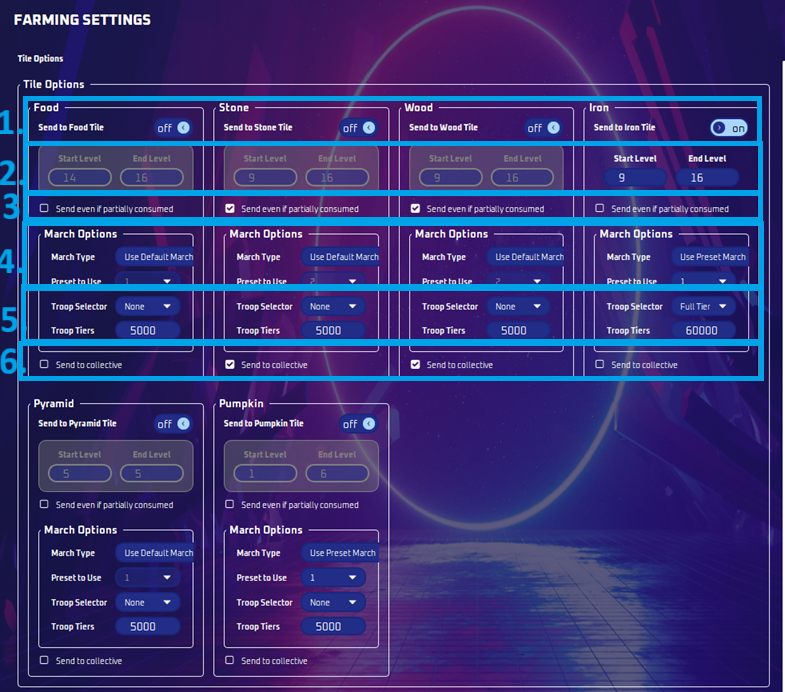
Tile Types:
- You can choose which kind of tiles you want to send to.
Tile Levels:
- You can choose which tile levels you wish to send.
Send Even If Partially Consumed:
- This will send to any tile.
March Type:
- If you pick Default March, the Evony Default March will be sent. Otherwise your first preset will be sent. Additionally, the top general in your list will be picked if a general isn’t present.
Troop Selector:
- None: Will send your full preset march.
- Power First: Will send the highest power troops.
- One Troop: Will send a single low-power soldier.
- Full Tiers: Send a specified quantity of all troop type and levels
Send To Collective:
- Using multiple PCs? Have Team Members on the bot? All tiles found via tile search will be sent to a queue you and your friends can share!
Use List General:
- This will use either the top general in the list, or attempt to find the list of generals you selected when joining rallies; if your preset has a general out, it will do that.
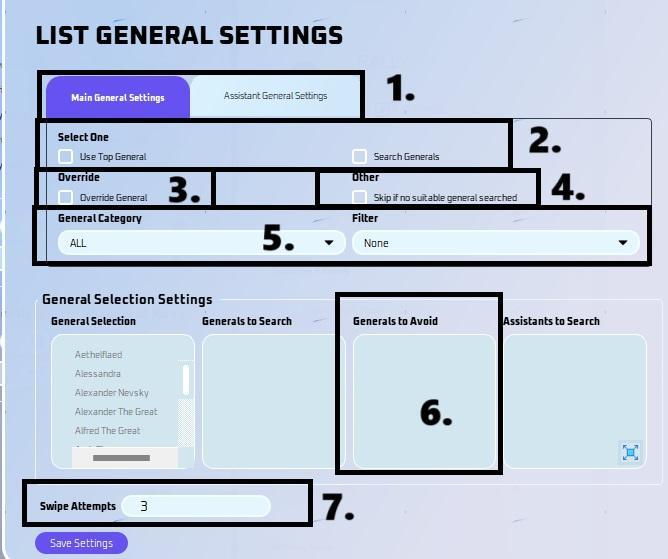
- List General Settings
- Pick here if this is for Main or Assistant General Settings.
- General Selection
- You can now select a list of generals you would like to search for when the general is not available in your preset.
- Override
- This has the ability to override the general in your preset or default march so that you can search for other generals.
- For Assistant General, click “remove assistant general” if you want to override preset general.
- Skip if no suitable general searched
- This will skip the boss if there are no suitable generals available based on your settings.
- General Category
- You can now filter by category (ALL, Development, Military, etc)
- You can now also filter by favorite or idle.
- Generals to Avoid
- You can now choose to avoid certain generals. This is used when selecting "Use top general". This won't matter for search generals due to the nature of it only searching for a specific general, thus naturally avoiding everything else.
- Swipe Attempts
- This is how many times it will swipe down to try and find the general you have listed.
- Take note, if you got a ton of generals, you need to increase the swipe amount, then again that will take even longer to join a rally.
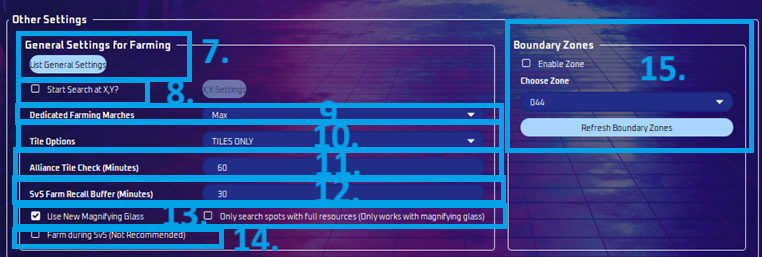
Start Search at X, Y:
- It will start at the X,Y coordinates you specified.
- Randomness will add/subtract the distance from your center point (X,Y).
Dedicated Farming Marches:
- Number of Marches you want to do farming.
Tile Options:
- Tiles Only: It will only send to rss tiles you picked on farming settings.
- Tiles and Alliance Tiles: It will send to rss tiles and to the alliance tile that you have set up in your alliance.
- Alliance Tiles Only: Will only send to the alliance tile set in your alliance
Alliance Tile Check:
- The frequency it goes to see alliance tile and send it.
SvS Farm Recall Buffer:
- Farming will no longer happen during SVS.
- You can now choose how soon to recall your marches before SVS in farming settings (in minutes). You can adjust this per your purge requirements. Note that times may not be exact, so do it extra early.
Farm Using Magnifying Glass
- This will use evony’s magnifying glass in finding tiles instead of scanning the map.
- Option to only send to full resource tiles.
Farm During SvS:
- You now have the option to farm during SvS. We recommend this option for newer servers that don't have SvS available yet.
Boundary Zones
- You can now create zones so that you do not set bosses, tiles, or collect entities from certain locations. You can make these boundary zones in the collective tab, more info here.
Note
Searching for tiles takes time, so do not stress out about it. Let it do its thing. It works just fine. Take advantage of Tile Search and Boss Finder and you will farm very efficiently.
If you do not, the bot will sleep for 30 minutes before resuming farming.