


Getting Started
City Growth Guide
City Growth Guide Automatically upgrades your city toward a target Keep level. You can choose which buildings to prioritize and enable research, daily…
このガイドはまだ日本語に翻訳されていないため、英語で表示しています。
City Growth Guide
Automatically upgrades your city toward a target Keep level. You can choose which buildings to prioritize and enable research, daily troop training, and quest reward collection. Once the Keep reaches your target level, building stops and the other enabled tasks continue.
Goal and Building
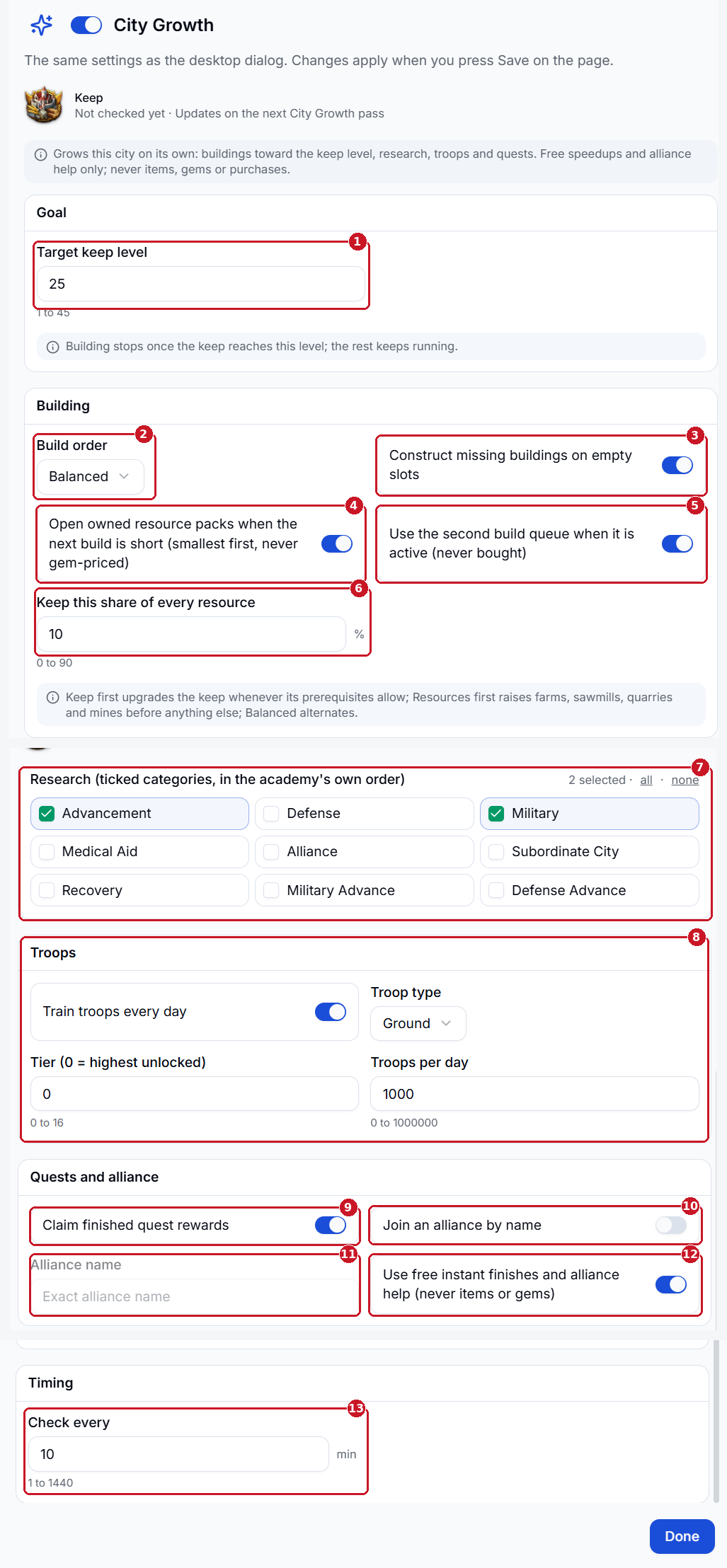
- Target Keep Level - Building stops when the Keep reaches this level. Other enabled City Growth tasks continue.
- Build Order - Keep First upgrades the Keep as soon as its requirements are met. Resources First prioritizes farms, sawmills, quarries, and mines. Balanced alternates between the two priorities.
- Construct Missing Buildings - Builds missing structures in empty slots. When off, Cloud upgrades existing buildings and leaves empty slots alone.
- Open Owned Resource Packs - Opens the smallest owned packs first when the next build needs more resources.
- Use the Second Build Queue - Uses the second queue when it’s already active.
- Keep This Share of Every Resource - Sets the percentage of each resource to keep in reserve.
Research, Troops, and Alliance - Research - Select the categories Cloud should research. It follows the Academy’s order.
- Troops - Enable daily training and choose the troop type, tier, and quantity. Set the tier to 0 to use the highest unlocked tier.
- Claim Finished Quest Rewards - Automatically claims rewards for completed quests.
- Join an Alliance by Name - Lets Cloud attempt to join the alliance you specify.
- Alliance Name - Enter the exact alliance name when Join an Alliance by Name is enabled.
- Use Free Instant Finishes and Alliance Help - Lets Cloud use free instant finishes and request alliance help.
Timing - Check Every - Sets how often Cloud checks City Growth, in minutes.
Click Done, then Save on the Profile page.