


Getting Started
Join Rallies Guide
Join Rallies Guide Join alliance boss rallies automatically. Choose which bosses to skip, how to build the march, which generals to use, and whether Join…
Diese Anleitung ist noch nicht auf Deutsch übersetzt und wird deshalb auf Englisch angezeigt.
Auf dieser Seite
Join Rallies Guide
Join alliance boss rallies automatically. Choose which bosses to skip, how to build the march, which generals to use, and whether Join Rallies can use stamina items.
Enable Join Rallies
- Open Accounts and select the account that will join rallies.
- Go to Settings → Modes, select Join Rallies, and click Save.
- Open the account’s assigned profile and select Rally in the profile sidebar.
Note
Profile settings apply to every account using that profile. Use a separate profile if your rally joiner needs its own settings.
Boss filters and march setup
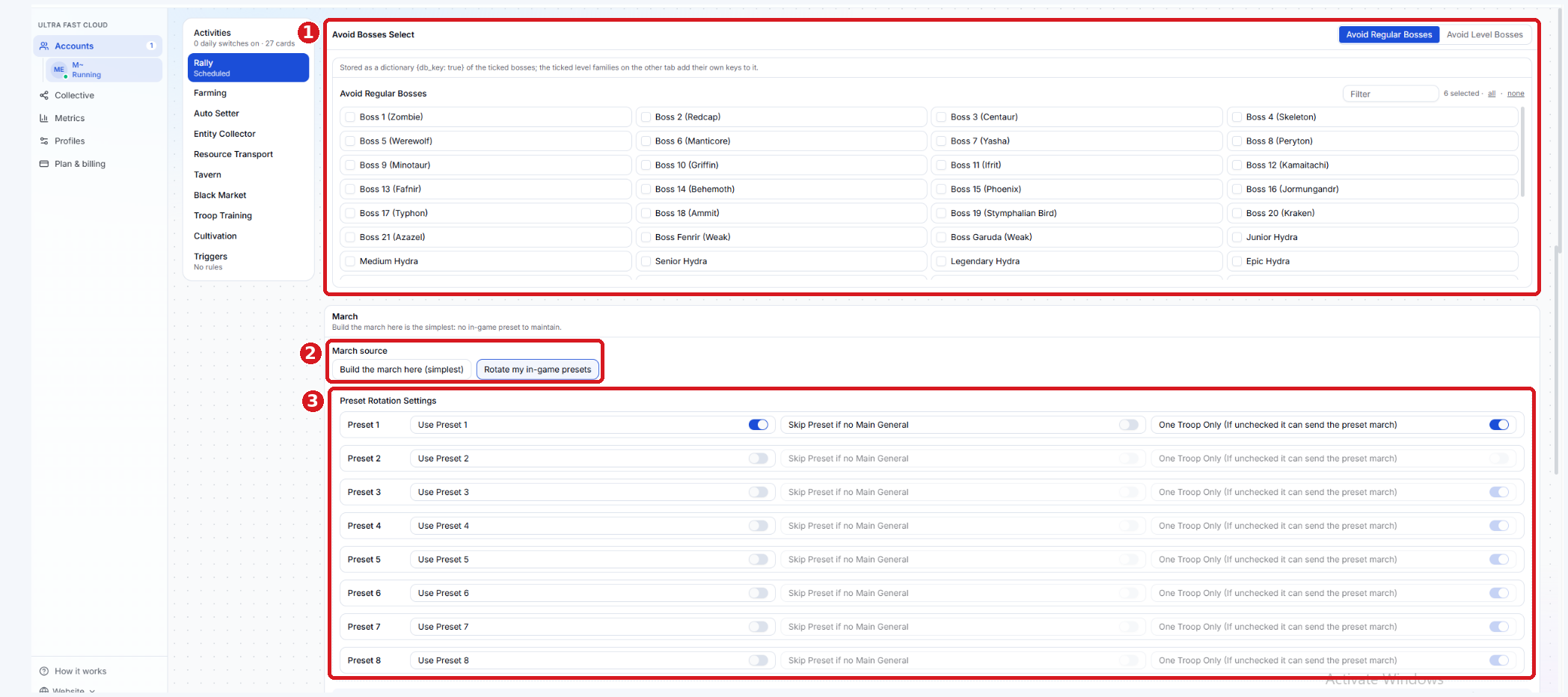
Avoid Bosses Select - Check the bosses you want the bot to skip. Use Avoid Regular Bosses for named bosses and Avoid Level Bosses for specific levels. For Vikings, Power Start and Power End are in millions. For example, a range of 0–999 skips Vikings in that range. Clear the Viking avoidance selection if you want to allow them at all power levels.
March source - Choose Build the march here (simplest) to configure a march in Cloud, this doesn't require a preset in game, or Rotate my in-game presets to use the march presets you already saved in Evony.
Preset Rotation Settings - These options apply when you choose Rotate my in-game presets.
- Use Preset - Enable at least one in-game preset. The bot rotates through the presets you enable.
- Skip Preset if no Main General - Skips that preset if its main general is unavailable.
- One Troop Only - Clears the preset troop selection and sends one troop. With this off, the bot can send the full preset march.
Generals, rally limits, and stamina
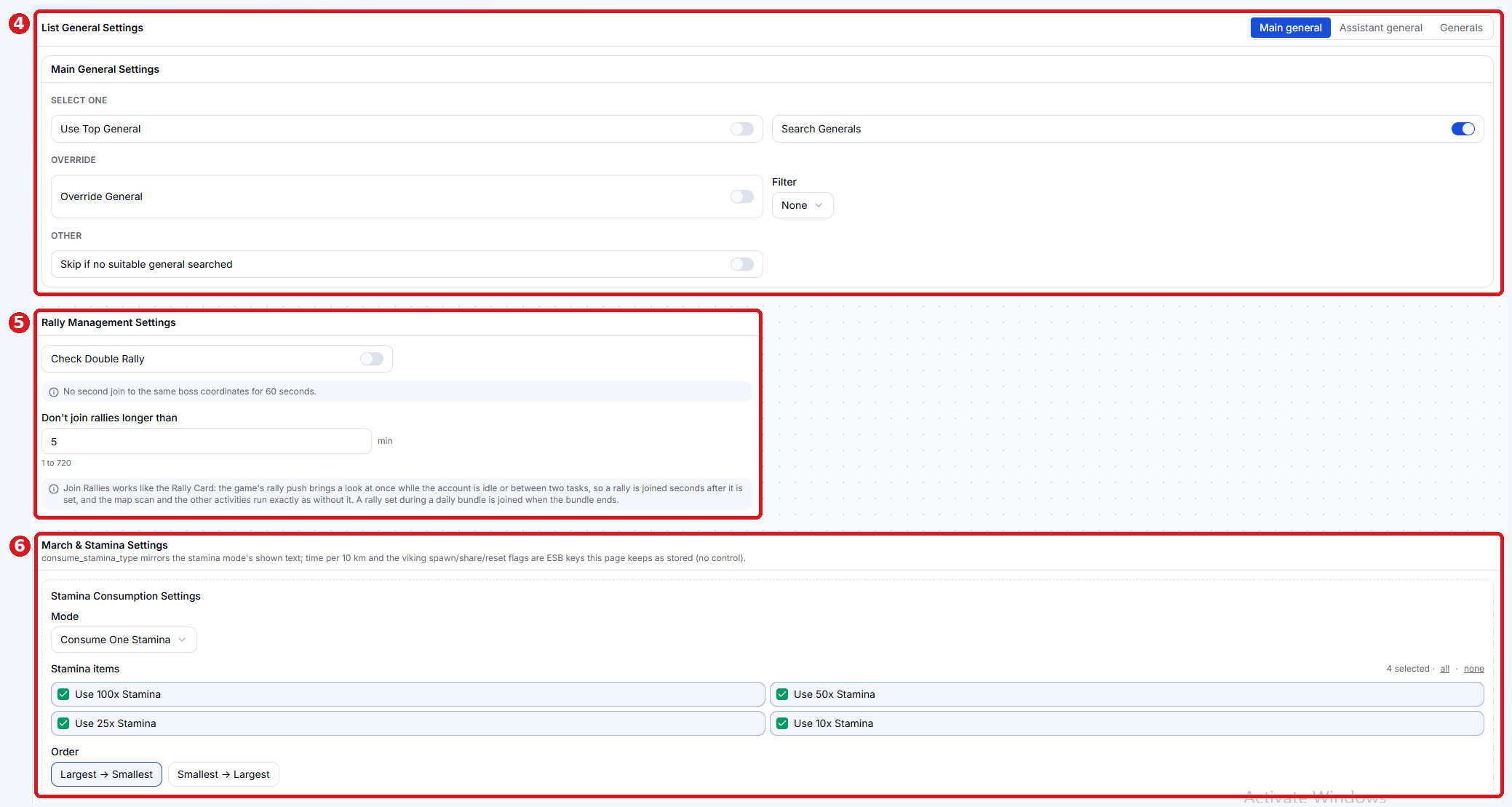
List General Settings - Use the Main general and Assistant general tabs to configure each role. Use Generals to manage the names used by your settings.
- Use Top General picks the top eligible general. Search Generals looks for specific names you’ve configured.
- Filter narrows the generals the bot considers. The avoid list applies when using Use Top General.
- Override General lets the bot replace the general already selected in the march. For Assistant General; Remove assistant general.
- Skip if no suitable general searched skips the rally attempt if the bot cannot find a suitable general using your settings.
Rally Management Settings
- Check Double Rally This is mainly for users whose join buttons didn't update due to recent lag issues.
- A workaround for users who are encountering 24H rallies.
- Don't join rallies longer than sets the maximum rally timer, in minutes. For example, enter 5 to allow rallies of five minutes or less.
- Cloud checks for rallies when the game sends a rally notification and the account is idle or between tasks. If the notification arrives during a daily bundle, the account checks after that bundle ends.
Stamina Consumption Settings - Choose how the bot uses stamina items when a march needs more stamina.
- Dont Consume Stamina - Will not use or consume stamina.
- Consume Max Stamina - Uses eligible items to refill stamina up to the maximum.
- Consume One Stamina - Uses one eligible stamina item when a refill is needed.
- Under Stamina items, choose which sizes the bot can use (100, 50, 25, or 10). Under Order, choose Largest → Smallest or Smallest → Largest.
Save and check the first run
- Click Save to keep your settings and changes.
- Return to the account page and click Start. If you changed the mode while the account was running, stop and start it again after saving.
- After an alliance boss rally is set, check Last Result or Logs for the outcome.
If the bot skips a rally, check the boss avoidance selections and maximum rally timer first. Then confirm a march is available, the required generals are free, and the account has enough stamina. If you use preset rotation, confirm at least one preset is enabled.