


Getting Started
iScout Guide
iScout Guide Link iScout to the Cloud Collective so it can send bosses, tiles, and entities to the Collective keys your accounts use. You’ll need an active…
Bu rehber henüz Türkçe diline çevrilmedi, bu yüzden İngilizce gösteriliyor.
Bu sayfada
iScout Guide
Link iScout to the Cloud Collective so it can send bosses, tiles, and entities to the Collective keys your accounts use. You’ll need an active iScout API subscription and an API key from iScout.
Connect your iScout API key
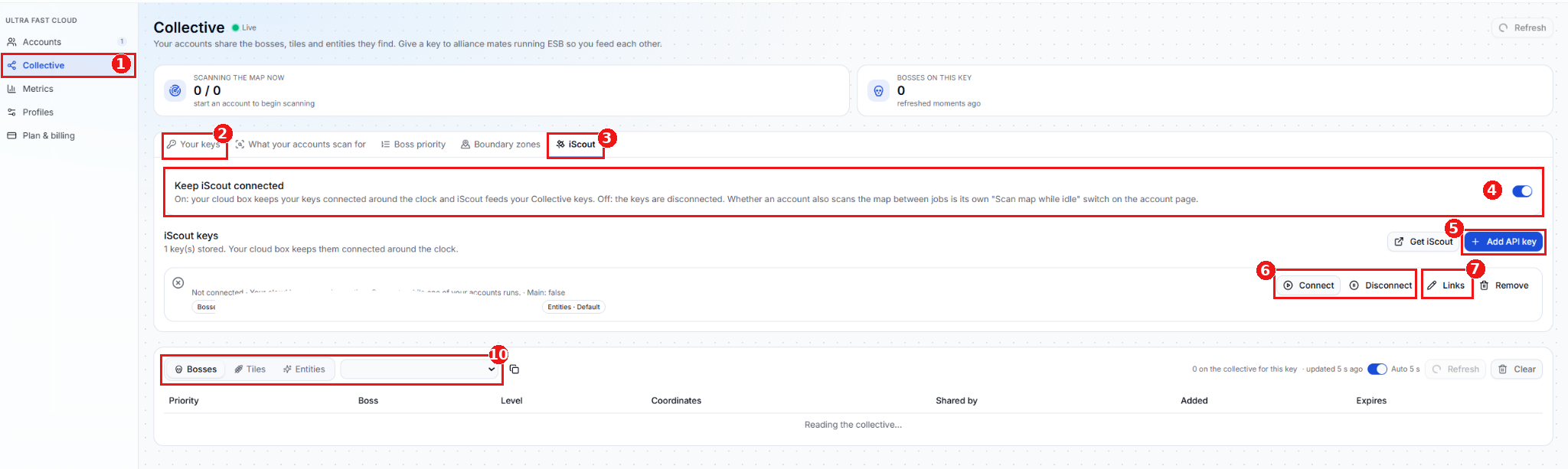
- Collective - Open Cloud and select Collective from the sidebar.
- Your keys - Create a new Collective key here if you need one. You can also use an existing key.
- iScout - Open the iScout tab to manage your API keys and their links.
- Keep iScout connected - Turn this on to keep your iScout keys connected around the clock. Scan map while idle is a separate account setting and can stay off if you only want iScout data.
- Add API key - Click Add API key and enter the API key provided by iScout.
- Connection status - Check the status beside the key. If it shows Not connected, click Connect. Use Disconnect to stop the connection for that key or Remove to delete it from the list.
- Links - Click Links beside the API key to open the window below.
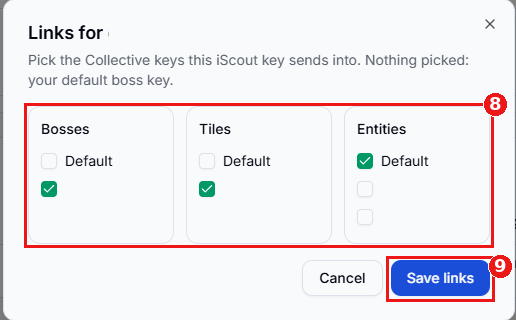
## Choose where iScout sends data - Pick your Collective keys - Tick the keys you want iScout to send data to under Bosses, Tiles, and Entities. If you leave every box unchecked, iScout uses your default boss key.
- Save links - Click Save links to apply your selections. To unlink a key, reopen Links, untick it, and save. If you want to stop the feed entirely, use Disconnect because an empty selection uses the default boss key.
## Verify the feed
Collective queue - Back on the Collective page, select Bosses, Tiles, or Entities, then choose the same key you linked. In your account’s profile, select that same Collective key for the corresponding data type so the account uses the feed. Users sharing the same Collective key can see the iScout data sent to that key. For help with iScout pricing, subscriptions, or API keys, contact iScout support.