






Getting Started
Account Rotation Guide
You can find Rotation in the Admin tab . This feature lets your accounts take turns running, so you don’t need all your emulators open at once. This helps…
이 가이드는 아직 한국어로 번역되지 않아 영어로 표시돼요.
You can find Rotation in the Admin tab. This feature lets your accounts take turns running, so you don’t need all your emulators open at once. This helps reduce RAM usage.
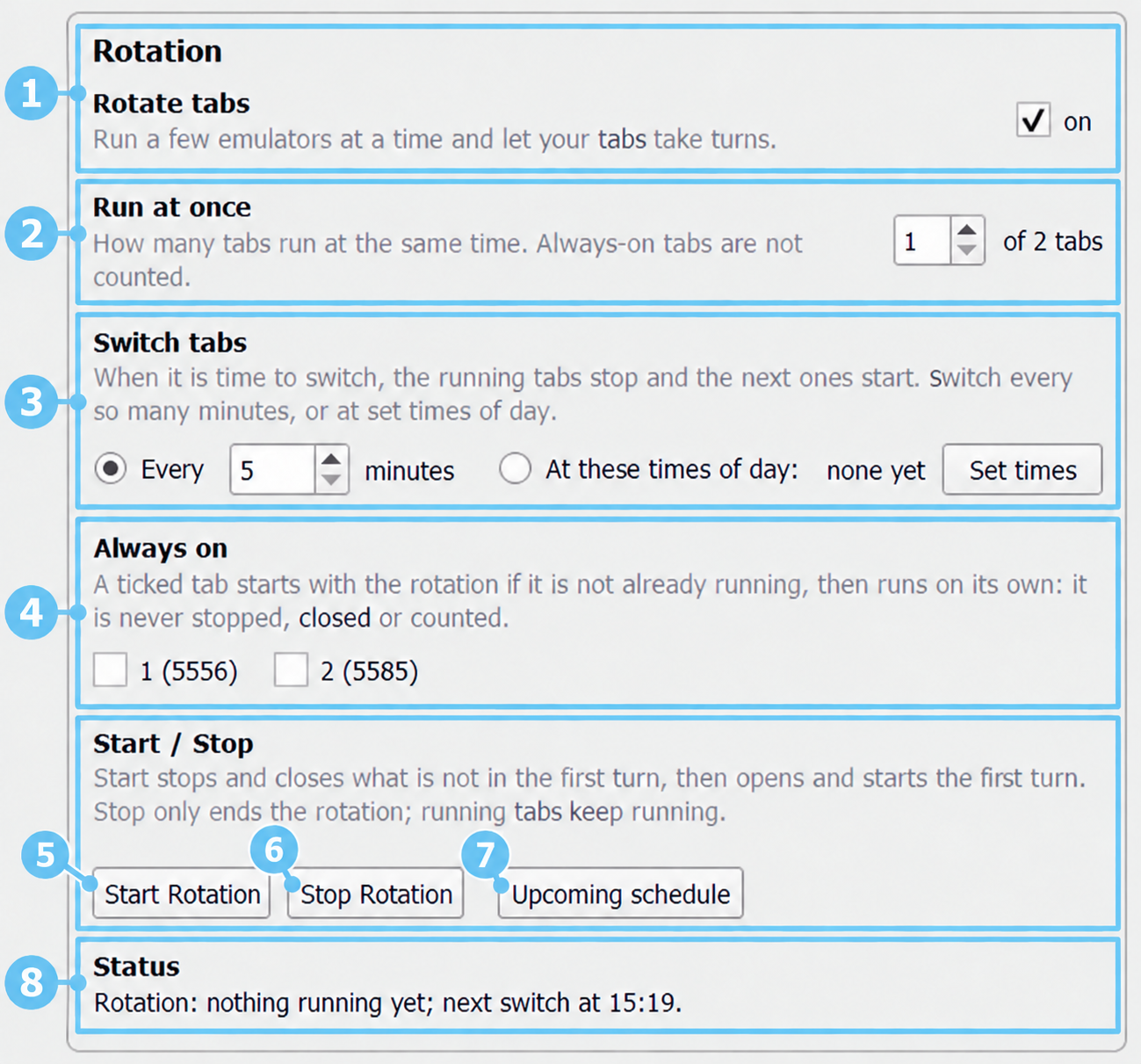
- Rotate tabs Enable this to let your accounts take turns automatically.
- Run at once Choose how many rotating emulators can run together. For example, setting this to 2 lets two accounts run while the others wait. Always-on accounts are not included in this number.
- Switch tabs
Choose when the running accounts stop and the next accounts take over:
- Every X minutes: switch at regular intervals, such as every 30 minutes.
- At these times of day: click Set times to choose specific switching times.
- Always on Tick any account you want to keep running without taking turns. It starts with rotation if it isn’t already running, and rotation won’t stop or close it. Example: “Run at once” set to 2, plus 1 always-on account, means 3 emulators run together.
- Start Rotation Click this when your settings are ready. The bot closes emulators waiting for their turn, then opens and starts the first group. Always-on accounts stay running.
- Stop Rotation Stops the automatic switching schedule. It does not stop the accounts already running.
- Upcoming schedule Shows which accounts are scheduled to run next and when they will switch.
- Status Shows the current rotation status, such as the next switching time or why rotation stopped.
Example 1: You have 4 accounts, no always-on accounts, and want only 2 running at a time:
- Set Run at once to 2.
- Set Switch tabs to Every 30 minutes.
- Click Start Rotation.
Accounts 1 and 2 run first. After 30 minutes, they stop and close, and accounts 3 and 4 start. The groups keep taking turns automatically.
Example 2: Keep your main account running while 3 farms take turns
- Run at once: 1
- Switch tabs: every 60 minutes
- Always on: tick your main account
Your main account stays running. Farm 1 runs for an hour, then farm 2, then farm 3, and the cycle repeats. 2 emulators run together: your main + 1 farm.
**Important:** manually starting or stopping a tab stops rotation. Click **Start Rotation** when you’re ready to resume.