






Automation Modes
Troop Training Guide
Troop Training mode trains the troop type and tier you pick, the number of times you set.
이 가이드는 아직 한국어로 번역되지 않아 영어로 표시돼요.
이 페이지에서
How to Use
Follow the steps below to understand and take advantage of this mode.
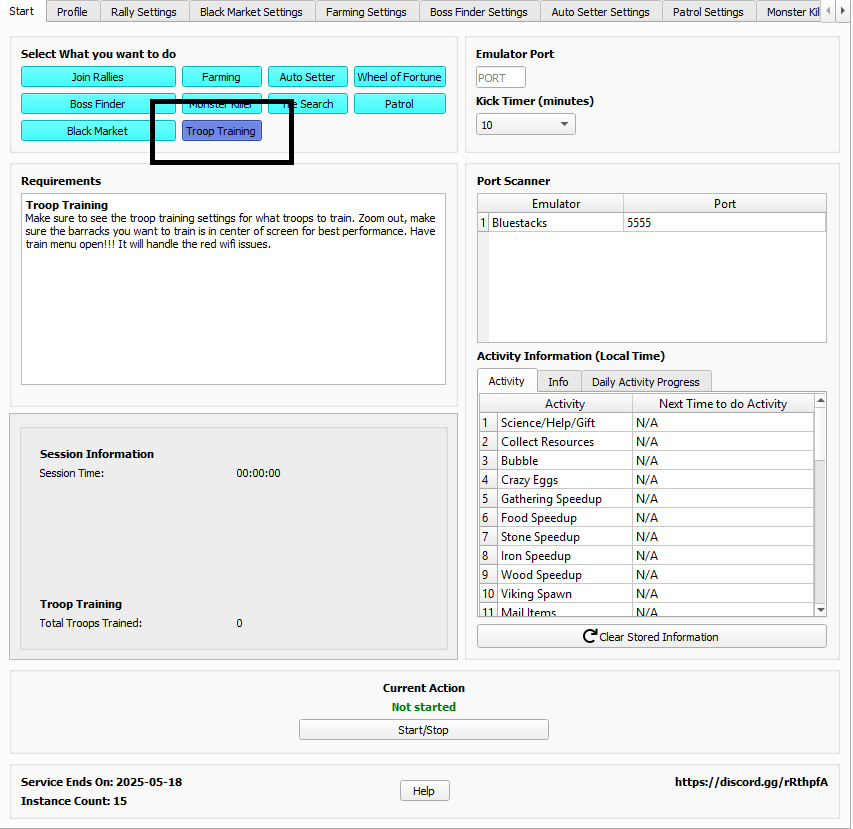
Mode:
- Make sure to select the “Troop Training” Mode as labeled in the photo below.
Troop Training Settings:
- You must go to the Troop Training Settings tab to adjust the settings.
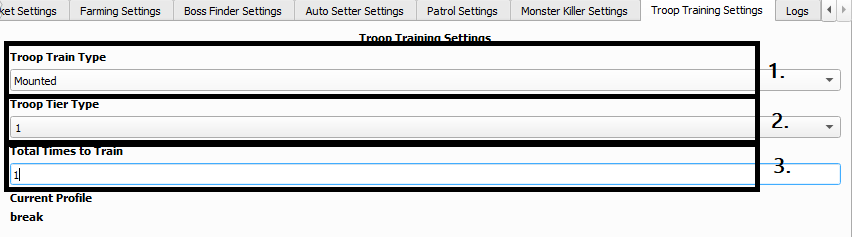
- Troop Train Type:
- Pick the Type of Troop you wish to train.
- Troop Tier Type:
- Pick the Tier of Troop you wish to train.
- Total Times to Train:
- Number of times the bot will Train the Troops you have picked.
Note
Make sure you have the troop train menu open, be zoomed out in game in city (we will try to zoom out for you), have the barracks you want clearly visible and in the center of the screen for best performance.
Have train menu open!!! It will handle the red wifi issues.